
Make something creative.

Describe an app, a game or a sketch. The Codevre agent writes it, runs it and shows you the result in one browser tab.

Try

The whole stack, docked in one tab.

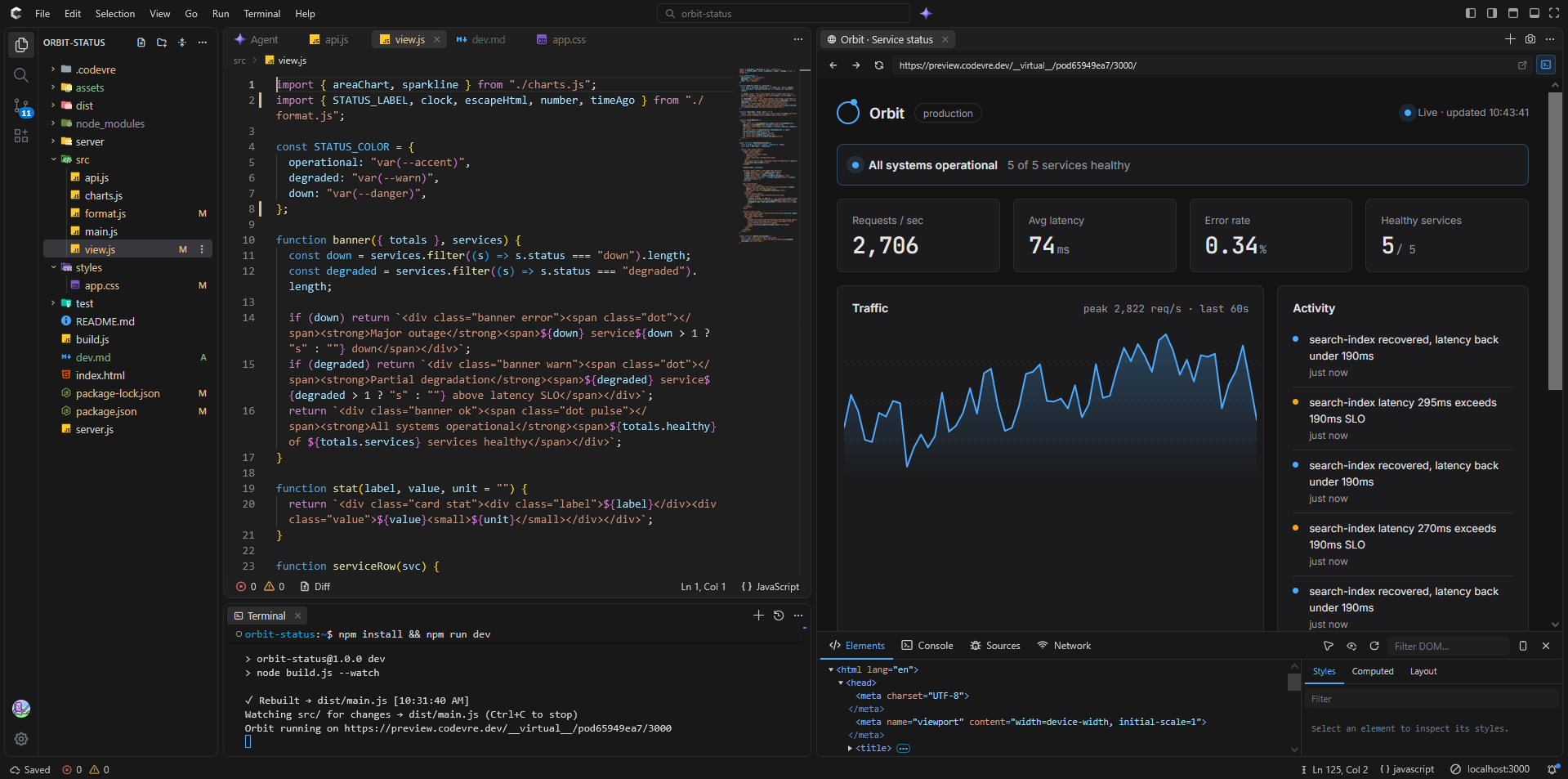
The Codevre IDE works like VS Code, with an editor, a Node.js terminal and a live browser side by side, and the coding agent built in as a tool. Arrange the panes however you work, and every project saves to your account.

Agent

An agent that works in the same place you do.

It isn't a chat box bolted onto the side. The agent uses the project you have open: the files, the terminal and the preview.

  • Reads and edits across many files in one pass
  • Runs npm scripts and reads the output
  • Checks the live preview before it says it's done
  • Runs on free models, so it costs you nothing
How the free agent works
Editor

Monaco, like VS Code

The editor behind VS Code, with the shortcuts, multi-cursor and IntelliSense you already know.

Browser

A live preview with devtools

Your running app sits next to the code. Start a dev server and the preview opens on its port.

Terminal

A real Node.js terminal, with nothing to install

Install packages, run scripts and start servers the way you would locally, on a full virtual file system. It's powered by Nodepod, which runs Node.js inside the browser, so your commands never wait on a remote machine.

npm installnpm run devnode server.jsnpx vite

A full coding agent, free to run.

The agent is one of the tools in the IDE. Codevre syncs the free models on OpenRouter into the agent panel. Pick one and you get the complete agent, with file edits, terminal commands and preview checks, without paying for tokens.

  1. Open the Agent panel Start the IDE in agent mode, or open the panel from any project you already have.
  2. Sync free models Codevre pulls the current list of free models, so new ones show up as OpenRouter adds them.
  3. Describe the change The agent plans, edits your files, runs them in the terminal and looks at the preview before it reports back.

Free models on OpenRouter change over time and some have rate limits. Codevre keeps the list current for you.

Code that draws.

Open a sketch by clicking one.

Your browser does the work.

Codevre runs the IDE and your projects on your own device, so there's no VM to start and nothing to wait for. Our servers only load and save them.

Build in the tab

Your code is bundled into runnable JavaScript right in the browser. No containers to spin up.

Run in a sandbox

The app runs in an isolated sandbox with its own URL, kept apart from the editor.

See it right away

No queue and no provisioning. Changes show up as fast as your machine can run them.

No server runs your code, so we don't pay for compute and neither do you.

Four editors, one account.

The IDE is where Codevre is headed. The smaller editors stay around for quick pages, single files and sketches.

The full VS Code-style workspace, with Node.js, npm, a terminal, a live browser, panes you can rearrange and the coding agent.

  • Node.js and npm in the tab
  • Agent with free models
  • Live browser and devtools
  • Dockable panes

Where Codevre started. A full editor with files, tabs, a live preview and AI chat, for HTML, CSS and JavaScript projects that don't need Node.js.

HTML, CSS and JavaScript in their own panes, with the result and a console updating as you type. Good for ideas you don't want to set up a project for.

A simple sketch editor built around q5.js, made for students and classrooms, with files for assets and no AI.

Made for classrooms.

Teachers set up classes in Codevre Learn. Students sign in with the IDs their teacher gives them, so no email address is needed.

  • A teacher dashboard for classes and students
  • Student accounts from a student ID and class ID
  • Runs on school Chromebooks with nothing to install

Teaching at a school, university or other institution? Using any Codevre editor with your classes needs an educator plan. Codevre Learn comes with it, but you don't have to use it.

AI is optional. Teachers can switch the agent off in the IDE, or use Sandbox or the q5 Editor, which have no AI at all.

Free to start.

The core of Codevre is free, including the agent on free models. Paid plans start at $5 a month when you need more storage.

  • 25 IDE projects
  • Unlimited sandbox sketches
  • 50 sandbox assets
  • Free coding agent